
Download your ChatGPT images — with their prompts.
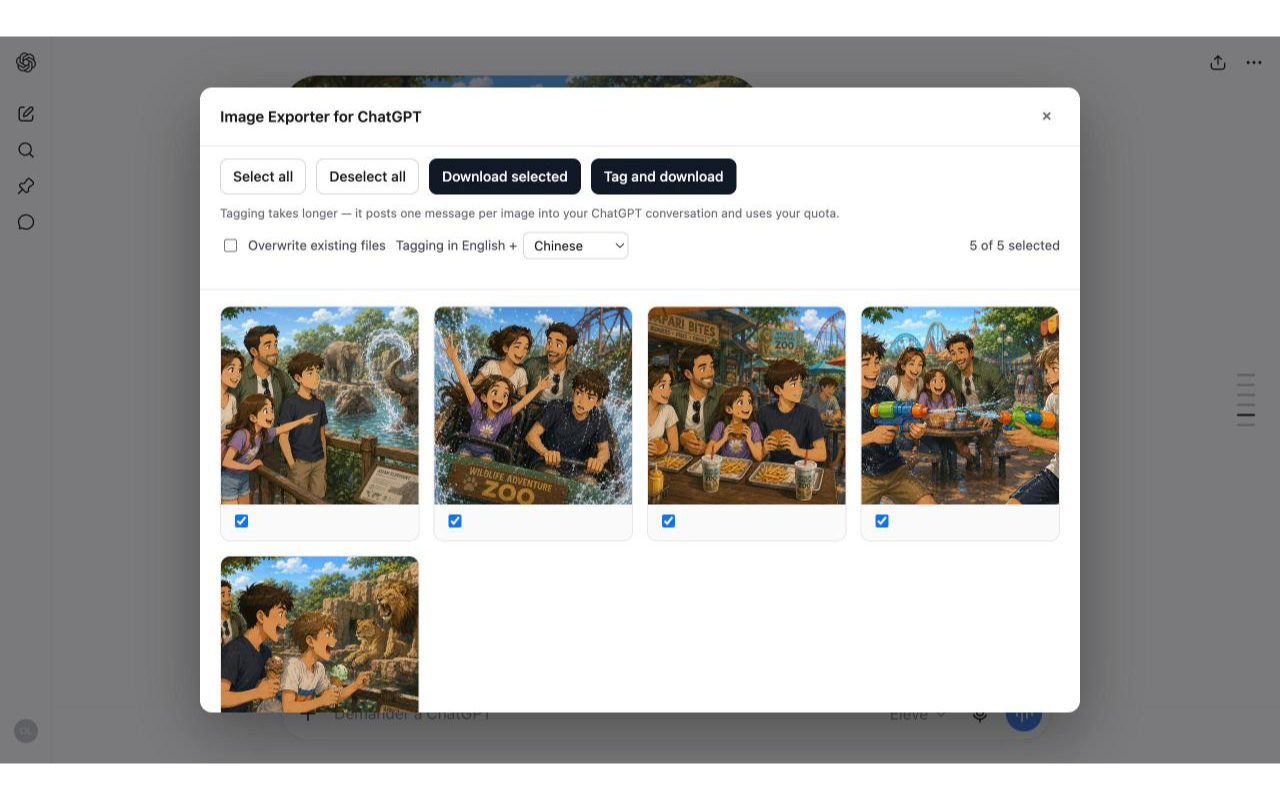
Image Exporter for ChatGPT scans the conversation you're viewing, shows every AI-generated image on one contact sheet, and downloads the originals to your computer — together with a metadata.csv recording each image's prompt. Optionally it writes AI keywords into the files themselves — so Spotlight and Lightroom find them by what's in them.
What you can do
Your images, your prompts, in one folder
Saving images one by one loses the prompt that made each of them. This extension exports the pictures and the words — so every file keeps its story.
Scan a conversation
Open a ChatGPT conversation, click the toolbar icon. The extension finds every AI-generated image through ChatGPT's own interface, using the session already in your browser.
Pick from a contact sheet
Every image appears as a thumbnail with a checkbox — select all, or just the ones you want, with a live count of what's selected.
Optional: AI keywords, inside the file
“Tag and download” asks ChatGPT for a title plus 25 English and 25 second-language keywords per image (20 languages available) and embeds them in each PNG's XMP metadata — where Adobe Bridge, Lightroom, and ExifTool read them.
Worth knowing: tagging posts one message per image into your own conversation and uses your ChatGPT quota.
Original files, tidy folders
Downloads the original bytes — nothing re-encoded, no quality loss — into Downloads/Generated Images/<conversation title>/, each file named with its date, time, and a slug of its prompt.
metadata.csv with every prompt
ChatGPT doesn't store a prompt with each image, so the extension reconstructs it from your conversation — your original request plus each edit you asked for — and records it per image in a CSV beside the files.
Honest to the end
If one image can't be tagged, it downloads untagged and the run continues. You can cancel mid-run. The completion banner reports exactly what worked and what didn't.
Private by design
No servers. Only ChatGPT's.
The extension talks only to ChatGPT, with your own session, and only on chatgpt.com — it has no access to any other site you visit. There is no server of ours behind it, and nothing to send your data to.
- Zero data collection. No accounts, no ads, no tracking, no analytics traffic.
- One site only. Runs on
chatgpt.com— nowhere else. - Your session stays yours. The token is used in memory for one scan, never stored or logged.
- Zero third-party code. No CDN, no trackers, no remote scripts.
- Your files, your disk. Everything it produces lands in your Downloads folder.
Questions
Common questions
What is Image Exporter for ChatGPT?
A free Chrome extension that exports the AI-generated images from a ChatGPT conversation to your computer, together with a metadata.csv of each image's prompt. It can also have ChatGPT suggest keywords and embed them in each PNG's metadata. Not affiliated with OpenAI.
Is it free?
Yes. Free, with no account and no API key — it uses the ChatGPT session already in your browser.
Is my conversation uploaded anywhere?
No. Everything happens in your browser. The only servers the extension talks to are ChatGPT's own, using your existing session. It has no servers of its own and contains no third-party code.
What does “Tag and download” do to my conversation?
It posts one message per selected image into your own ChatGPT conversation (plus one at the start of the run) asking for a title and keywords. Those messages stay visible in your chat history and use your normal ChatGPT quota. The plain download does not post anything.
Where do the keywords end up?
In the metadata.csv, and — for PNG files — embedded in the file itself as XMP title and subject fields that Adobe Bridge, Lightroom, and ExifTool read. WebP images get their keywords in the CSV only. Note that macOS Finder does not reliably show PNG keywords; exiftool does.
Which browsers and pages does it work on?
Google Chrome, on chatgpt.com — one open conversation at a time. Other Chromium browsers are untested.
Keep the prompt with the picture.
Install Image Exporter for ChatGPT and get your images out of a conversation — originals, plus a CSV of what you asked for.